

How BIMI works: from DNS to inbox logo
Learn how the different pieces fit together to show your logo in an email client.
BIMI is an email standard and technical specification. In practice, implementing BIMI requires two things: configuring specific Domain Name System (DNS) records for the domain you send email from, and purchasing a Mark Certificate for each domain you want email clients to associate with your logo. A Mark Certificate is similar to an Extended Validation SSL certificate. It serves as public proof of ownership of your domain and business.
If terms like DNS and SSL certificate are unfamiliar, don't worry. We cover them in detail in later guides. For now, this page walks through a high-level example showing how the different components work together to determine whether your logo appears next to your emails.
Example: Northloop Financial
To illustrate the flow, consider a fictitious business, Northloop Financial, sending you an email. Northloop Financial provides financial services, so establishing trust in its email communications matters.
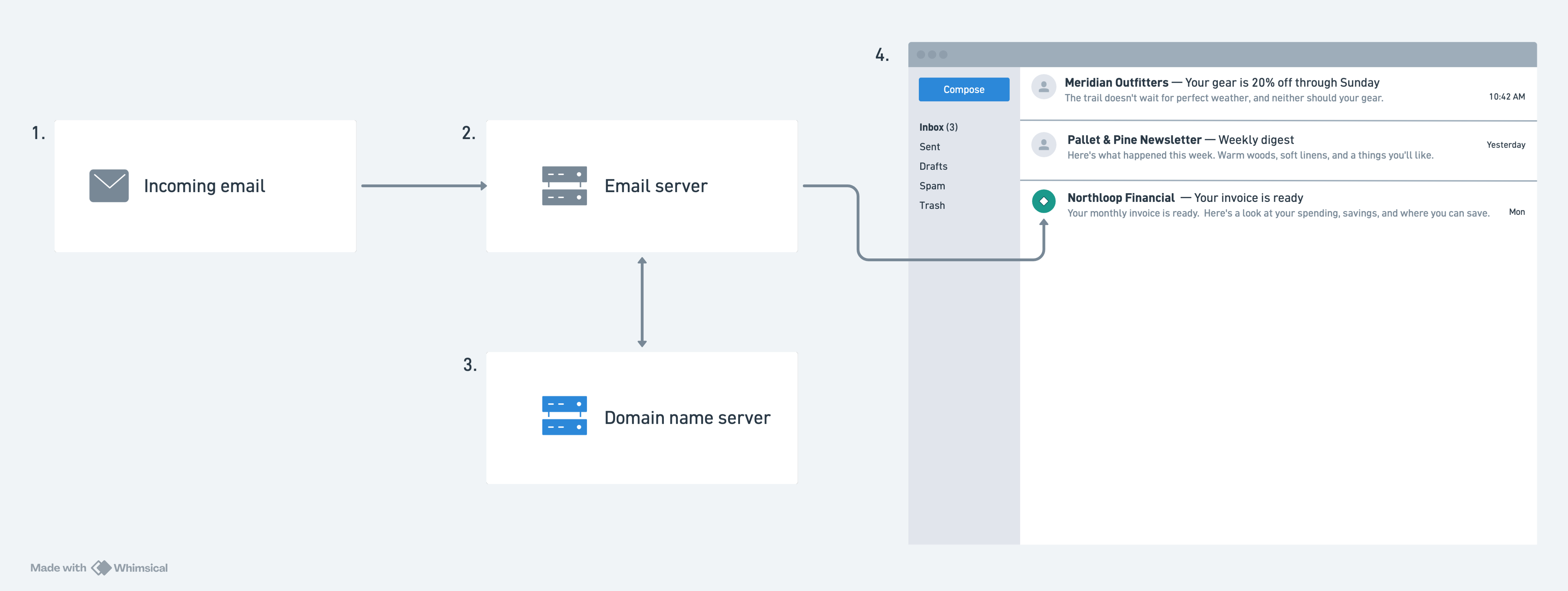
Northloop Financial sends an email
It has implemented BIMI for its domain, northloopfinancial.com, so its logo will appear alongside its emails in your inbox.
Your email provider checks the domain's configuration
When your email provider receives an email from a northloopfinancial.com address, it queries a public DNS server to check the domain's current configuration for:
- DMARC record: The DMARC TXT record must be configured with the policy set to
p=quarantineorp=reject. - SPF and DKIM records/alignment: The email must pass SPF and DKIM checks, and both must align with the domain shown in the "From" header.
- BIMI record: A published TXT record containing the URL to the logo and mark certificate.
If these terms are unfamiliar, don't worry, we cover them in later guides. For now, understand this step as your email provider verifying that northloopfinancial.com is configured correctly to display the Northloop Financial logo.
The DNS server returns the configuration
The public DNS server returns the current configuration for northloopfinancial.com to your email provider. If any of the records above are missing or misconfigured, your email provider will not display the logo.
The logo is displayed
Northloop Financial's DNS records are configured correctly, so your email provider displays the Northloop Financial logo alongside its emails. Since this configuration happens at the domain level rather than per email service, every BIMI-supporting email provider will display Northloop Financial's logo.
Next steps
This example is intentionally high level. Its purpose is to give you a structural mental model of BIMI's components and how they interact before you begin implementation. When you're ready to move into the details, continue to the prerequisites section to learn about the groundwork you'll likely need to complete first.